✅ TopBottomEA MT5 FREE ($598) – Honest M1 Reversal GBPCAD, 1 Pos No Grid!

Looking for an EA that is not martingale, not grid, and supports small capital? TopBottomEA MT5 is one of the most structurally honest EAs on the market — only 1 position at a time, every position protected with a hard Stop Loss, with over 4 years of real trading according to its developer lizhi fu on MQL5 (official price $598).
Here HG Trade shares TopBottomEA_fixed.ex5 for MT5 — ready to attach, backtest and forward test straight away. No complicated setup, just attach to chart and follow the recommended settings below.

⚙️ How TopBottomEA Works
As the name suggests — Top = sell at the top, Bottom = buy at the bottom. This is a short-term mean reversion EA that hunts price extremes during quiet market hours.
- Core Engine: Williams %R (period 110) detects when price is at the extreme of the last 110 minutes (BUY when WPR < -95 at the bottom, SELL when WPR > -5 at the top) + Bollinger Bands (20, 2.0) as a volatility filter.
- Trading Session: ~18:00 – 02:00 GMT (Asian session). No entries outside this window, but open positions are still managed.
- Position Management: Maximum 1 position at any time. No averaging, no recovery, no hedging. Structurally impossible to become martingale/grid.
- Why It Stands Out — No Martingale: This is the most attractive point. Unlike many EAs that double lots after a loss, TopBottomEA uses fixed lot or controlled compounding only. No lot multiplication, no dangerous grid. What you risk is what you see.
- Risk Control: Hard Stop Loss at ~80 pips on the server + virtual Take Profit at ~30 pips managed by the EA. No trailing, no break-even — win is cut, loss is held full. That is why it needs a high win rate to stay profitable.
- Frequency: On average ~4 trades per day, average holding time ~12 hours. Expect a calm, fluctuating equity curve — not a straight line.
Slow = Safe, Fast = Blow: When an EA is constrained to one position with a strict stop loss, risk is controllable. When it relies on no stop loss and holding, risk is uncontrollable. TopBottomEA chooses the first path.
💱 Timeframe & Pairs
Timeframe: M1 ONLY. The EA forces M1 internally for all indicators, so you must attach it to an M1 chart regardless of what your chart shows.
Officially Supported & Optimized Pairs:
| Pair | WPR Period | Stop Loss | Take Profit (Virtual) | Status |
|---|---|---|---|---|
| GBPCAD | 110 | 800 | 300 | ⭐ Main Pair |
| EURSGD | 140 | 700 | 160 | ⭐ Main Pair |
| GBPCHF | 110 | 600 | 200 | Tuned |
| CHFSGD / GBPSGD | 60 / 35 | 700 | 160 | Tuned |
If you run it on any other symbol, it will silently use the GBPCAD preset. For best results, stick to GBPCAD M1 first, then add EURSGD M1 on a separate chart.
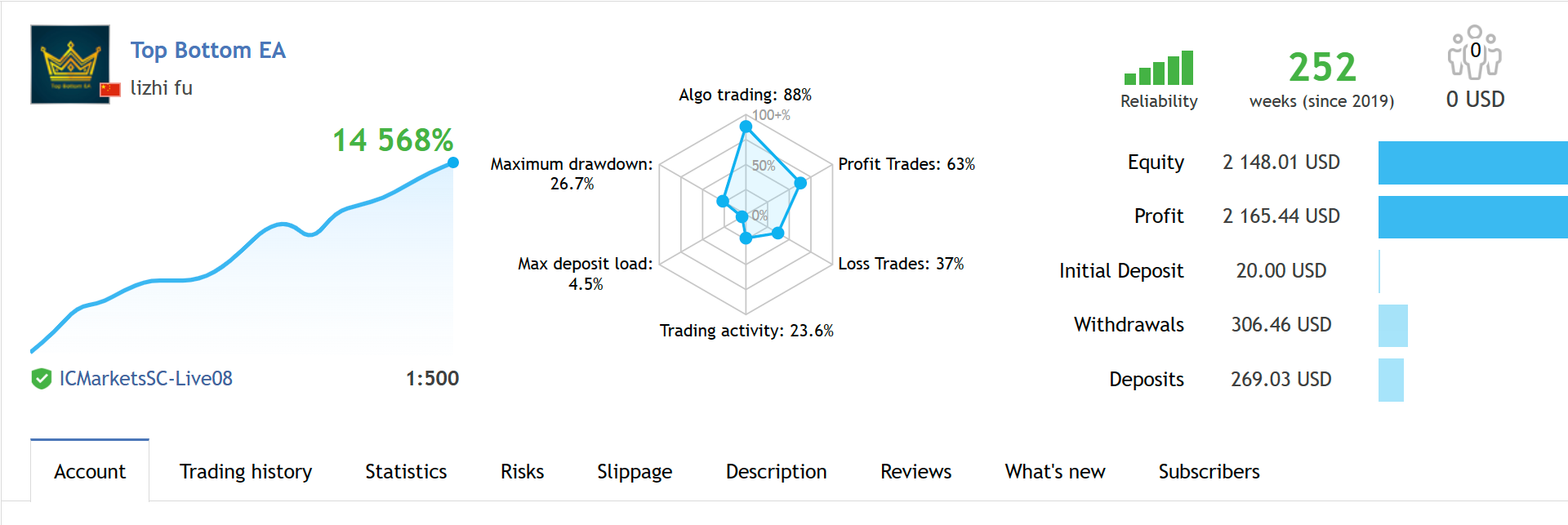
Live signal reference vs. backtest — a healthy EA fluctuates, only martingale makes a straight line.
💰 Minimum Capital & Lot Recommendation
One of the key advantages of TopBottomEA is that it was built for small capital. The developer even demonstrates a $20 challenge account running for years.
- Vendor Recommendation: $1,000 for 2 pairs → use 0.03 lots (conservative) or 0.05 lots (aggressive). Default fixed lot 0.10 = ~6% risk per Stop Loss on a $1,000 account.
- Compounding Option: Turn ON
CompoundInterestSwitch+ setRisk = 40→ lot auto-scales to ~2.4% risk per SL (e.g., $500 → 0.02 lot / $12 risk, $1,000 → 0.04 lot / $24 risk, $5,000 → 0.20 lot / $120 risk). - Practical Minimum: For comfortable testing, start with $500 - $1,000 on a Raw spread account. Below $300, use 0.01 lot and test on 1 pair only (GBPCAD).
🏦 Recommended Broker
TopBottomEA is very sensitive to spread (it blocks entries when spread > 50 points / 5 pips). Exotic pairs like GBPCAD and EURSGD can have wide spreads on standard accounts, especially during rollover 21:00-22:00 GMT. Broker choice decides half your result.
Vendor Official Recommendation: ICMarkets Raw Spread and FPMarkets Raw Spread — these give the closest results to the vendor's live signal. If you don't have them, use any true Raw/ECN with GBPCAD spread consistently below 3 pips during Asian session.
HG Trade Tested Setup:
- For most stable spreads & 3-5 year tick history: Exness Raw / ICMarkets Raw
- For bonus + fast execution testing: FBS — just make sure to re-check spread on GBPCAD at 18:00-02:00 GMT before going live
📈 What to Expect (Honest Overview)
This EA is not a holy grail and not a straight-line money printer. That is actually a good sign — only martingale EAs make a straight line before blowing up. A healthy EA grows by fluctuating.
- Most months will be flat or small profit (+1-3% during 80% of market conditions), with a few weeks of fast growth (+5-10%) when the Asian range is perfect — you need patience to survive the 80% to get the 20%.
- Because of the 30 pips win vs 80 pips loss ratio, it needs a high win rate (~75%+) to be profitable. Real profit comes from stable long-term accumulation, not from one big win.
- No EA wins every day. Treat it like planting vegetables — check less, grow more. Impatience is the biggest risk when using any EA.
⚙️ How to Install (MT5)
- Copy TopBottomEA_fixed.ex5 to
MQL5 → Expertsfolder and restart MT5. - Open GBPCAD M1 chart (and EURSGD M1 on a separate chart if you run 2 pairs).
- Drag the EA onto the chart → Enable Allow Automated Trading → Keep default inputs first (
Lots 0.10, Compounding OFF, Spread Limit 50). - For $1,000 / 2 pairs, change to 0.03 lots or enable Compounding ON (Risk 40). No need to adjust other parameters.
- Keep MT5 running 24/7 on VPS — the Take Profit is virtual and only executes while the terminal is online. Only the Stop Loss stays on the server.
📥 Free Download
TopBottomEA_fixed.ex5 (MT5 • Ready to Use)
Includes: .ex5 + Presets (GBPCAD / EURSGD)
🛠️ HG Trade Essential Tools
To get clean results, your broker and VPS must be solid — a laggy VPS or wide spread can make even a good EA look bad. This is what we use:
🥇 THE #1 BROKER FOR EAs — Raw Spreads
Exness: https://one.exnessonelink.com/a/2hwkmt08qh
Best Raw spreads for GBPCAD/EURSGD + full tick history for valid backtesting. A must for this EA.
🎁 LIGHTNING-FAST EXECUTION AND BONUSES
FBS: https://tinyurl.com/hgtrade
Great alternative for testing with bonuses on top of fast execution.
━━━━━━━━━━━━━━━━━━━━
💻 VPS FOR 24/7 UPTIME
━━━━━━━━━━━━━━━━━━━━
🚀 FXVM — Built for MT4/MT5
FXVM: https://fxvm.net/?aff=42497
Low latency to broker servers — critical because this EA's Take Profit is virtual and needs 24/7 uptime.
🇮🇩 BEST BUDGET LOCAL VPS — Indonesia
Digitalku: https://www.digitalku.com/aff/5449
Stable Indonesia-based VPS at a budget-friendly monthly price.
⚠️ Risk Disclaimer
Trading involves risk. Past performance (including the vendor's 4-year live signal, last updated January 2024) does not guarantee future results. Always forward test on demo or cent account before going live, use proper lot sizing, and never risk more than you can afford to lose. Use only cold money that you will not need in the near future. This share is for educational purposes only and is not investment advice.
🔗 References
- TopBottomEA MT5 — Official MQL5 Market
- TopBottomEA MT4 Version
- Band Trend Indicator (Bonus)
- Live Signal — Challenge Minimum Funds (last update Jan 2024)
- TopBottomEA Public Channel
- HG Trade Telegram — t.me/eahgtrade
Post a Comment