Opal EA MT4 FREE ($580 Value) — EURUSD Recovery +105% Growth


Looking for a Forex-major EA instead of yet another Gold scalper? Opal EA v1.0 is an AI-driven EURUSD H1 system trading psychological round-number levels + money management + news/time filters + recovery grid + two-step trailing — built by Oeyvind Borgsoe (Relevant Trading, Norway) on MQL5 (official price $580, published 11 November 2023, 70 demos).
Here HG Trade shares Opal EA v1.0.ex4 for MT4 — attach it to EURUSD H1 and forward-test. Vendor reference: MQL5 Live Signal Opal: +105.83% growth over 150 weeks from $500 (with $331 withdrawn), 1,996 trades, 85.62% win, Profit Factor 1.83. ⚠️ Please read the honest-flag box below first — this EA runs a recovery (grid-style) system with a large gap between balance drawdown and equity drawdown.
Opal holds trades for ~3 hours on average and manages recovery baskets around round numbers — so spread, commission, execution and swap decide almost everything. If you want results close to the live signal, start on the same type of broker + VPS we use. It only takes about 3 minutes:
🥇 OPEN EXNESS RAW
🧪 TRY EXNESS CENT FIRST
Free to register • Standard/ECN • MT4 ready • Using our link supports free EA shares, set files & updates

⚙️ How Opal EA (Claimed) Works
Per the vendor: read AI-driven calculations + round-number psychology, filter by time and news, then manage every basket with recovery logic and two-step trailing. Patience plus averaging is the entire pitch.
- Round-Level Logic: Identifies psychological whole-number zones where human traders cluster stops and entries, and builds entries around those models on EURUSD H1.
- AI-Driven Calculations: Vendor's algorithmic engine scores decision quality and trade management — marketed as adaptive rather than curve-fitted, so forward demo is the only valid test, on a Standard/ECN broker.
- Recovery System (GRID — read carefully): Instead of a fixed stop loss, losing positions are averaged and worked back to profit as a basket. This produces the high win rate — and the 27% equity drawdown. Size for the worst basket, not the average trade.
- News + Time Filters: Built-in news protection filter and time filter pause trading around high-impact events and off-hours — keep them ON, they are part of the edge.
- Two-Step Trailing + Money Management: Open baskets are trailed in two steps while the money management module caps exposure at low-mid risk by default. Do not raise risk before 4+ verified weeks.
- VPS 24/7: A basket-managing EA must stay online around the clock — never let recovery baskets sleep with your laptop.
Grid honesty in one line: a recovery EA converts choppy ranges into steady wins and converts one-way trends into floating drawdown — your 4-week demo on defaults shows which side of that trade you are standing on.
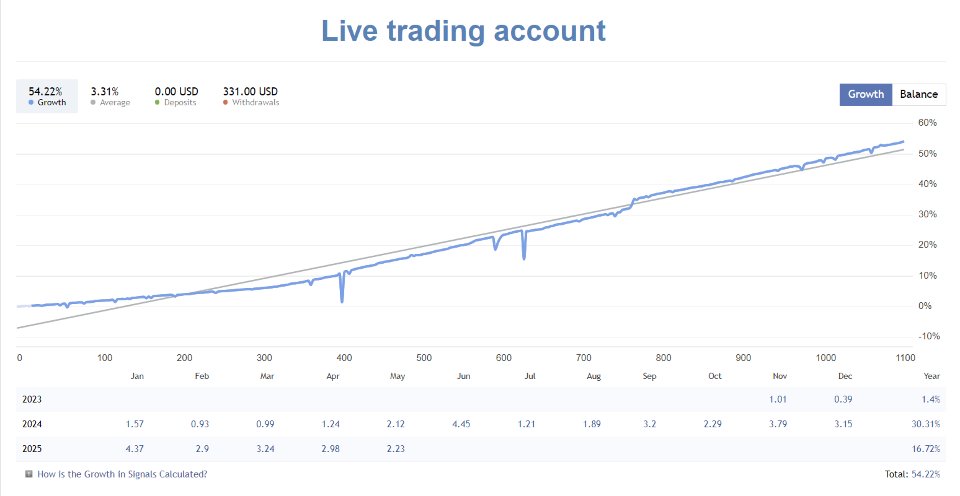
Screenshot #2 — Opal EA on the official MQL5 Market page (click to enlarge).
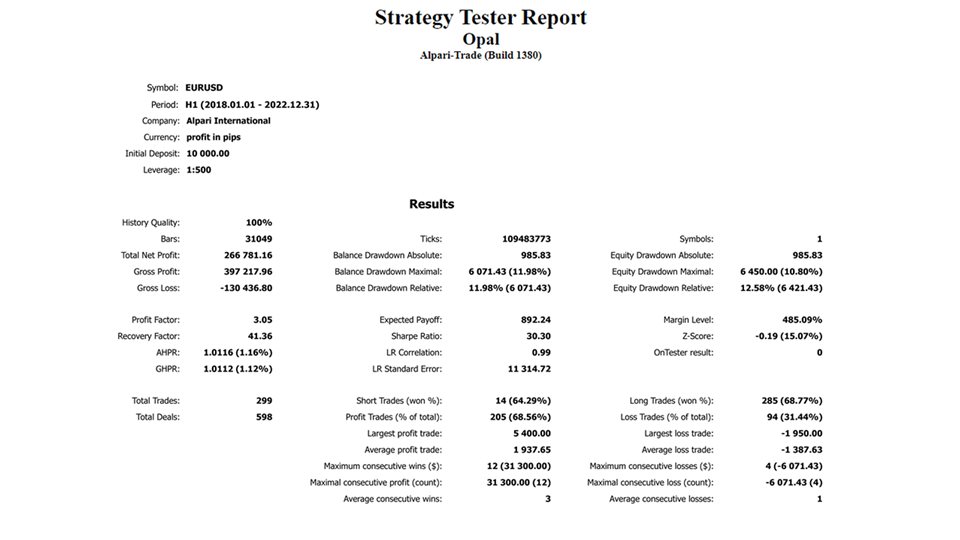
Screenshot #3 — Opal EA settings and panels on MQL5 (click to enlarge).
🏦 Quick Heads-Up Before You Test (This Decides Most of Your Result)
| Broker | Why Traders Pick It | Best For |
|---|---|---|
| 🥇 FBS | Tight spreads + 100% deposit bonus — double margin for longer forward-testing | Top pick (live + bonus) |
| 🧪 Exness Cent | Has a Cent account — the safest way to run your first EA test with small capital | Safest first test |
🧪 TRY EXNESS CENT FIRST
Why use our link? Same trading conditions, no extra cost — plus free set files, updates & HG Trade support.
💱 Timeframe & Pair
Timeframe: H1 ONLY. Pair: EURUSD ONLY. Run the EA only on EURUSD H1 on Exness Standard MT4 — one chart is all you need. Round-level models plus news/time filters were all tuned for this setup.
| Symbol | Timeframe | Strategy | Protection | Status |
|---|---|---|---|---|
| EURUSD | H1 | AI + Round Levels + Recovery Grid | News/Time Filter + 2-Step Trailing | ⚠️ GRID — VERIFY FIRST |
One chart = one EA. Please do not attach it twice with the same Magic Number — orders will duplicate and the basket logic gets confused. Just let one EURUSD H1 handle everything.
💰 Minimum Capital & Lot Recommendation
The vendor spec says $100 minimum, and the live Opal reference ran from $500 (Vantage 1:500, ~2 trades/week, 3-hour avg hold) — but remember the 27% equity drawdown behind the smooth balance curve. For a recovery system, fund for the worst basket, not the minimum. Open the right account type from day one: Exness Standard MT4 for live, FBS if you would like some bonus margin while testing.
| Account Type | Recommended Capital | Starting Lot | Open Where |
|---|---|---|---|
| Minimum Test | $300 - $500 | Defaults (low-mid risk) | Exness Standard Demo |
| HG Trade Recommended | $1,000+ | Defaults, never raise early | Exness Standard |
| Cent Alternative | 30,000 - 50,000 cents (~$300-$500) | Defaults | FBS |
- Leverage: 1:500 ideal (as in the live signal) / 1:100 minimum.
- Lot Mode: Money management module with low-mid risk defaults. Start with defaults everywhere.
- News/Time Filters: Keep both ON — they are part of the edge, not optional extras.
- Hedge / Netting: Run on a standard MT4 account and never combine with another EA on the same account.
🏦 Recommended Broker + VPS (Please Do Not Skip This)
If you would like your results to look anything like the live signal, it really helps to copy the same stack: a Standard broker plus a nearby VPS. Recovery baskets must be managed tick-by-tick without disconnects.
🥇 STEP 1 — MAIN BROKER FOR EURUSD RECOVERY
👉 TRY EXNESS CENT
Consistently tight EURUSD spreads for H1 basket averaging plus quick execution for trailing.
🎁 STEP 1B — IF YOU PREFER A BONUS ACCOUNT
👉 OPEN EXNESS RAW
A handy second option for forward-testing with bonuses and fast execution.
━━━━━━━━━━━━━━━━━━━━
💻 STEP 2 — VPS SO MT4 STAYS ONLINE 24/7
Recovery baskets and trailing must never sleep with your laptop.
🇮🇩 In Indonesia → Digitalku (affordable, low ping)
👉 RENT DIGITALKU VPS
Low latency to your broker server, which matters a lot when baskets are managed tick-by-tick.
🌍 Outside Indonesia → FXVM (built for MT4/MT5)
👉 RENT FXVM VPS
A stable local VPS at a friendly monthly price — try to keep ping under 50ms to your broker.
📈 What to Expect (Honest Overview)
This is not a holy grail and not loss-proof. Opal is upfront about being a recovery-based EURUSD system — quiet weeks, high win rate, then floating baskets that test your nerves.
- Normal Conditions (ranging EURUSD): Steady small wins near round levels — like the live reference: ~2 trades/week, 3-hour avg hold, 85.62% win, PF 1.83.
- Quiet / Choppy Markets: Expect few trades or a flat week. That is the time/news filter waiting patiently, not an error.
- News / Strong Trends: One-way moves open recovery baskets with growing floating DD. Never disable the news filter to "catch more trades".
- Very Broker-Sensitive: Wider spreads delay basket recovery badly. Always backtest with Every tick based on real ticks + your real broker spread.
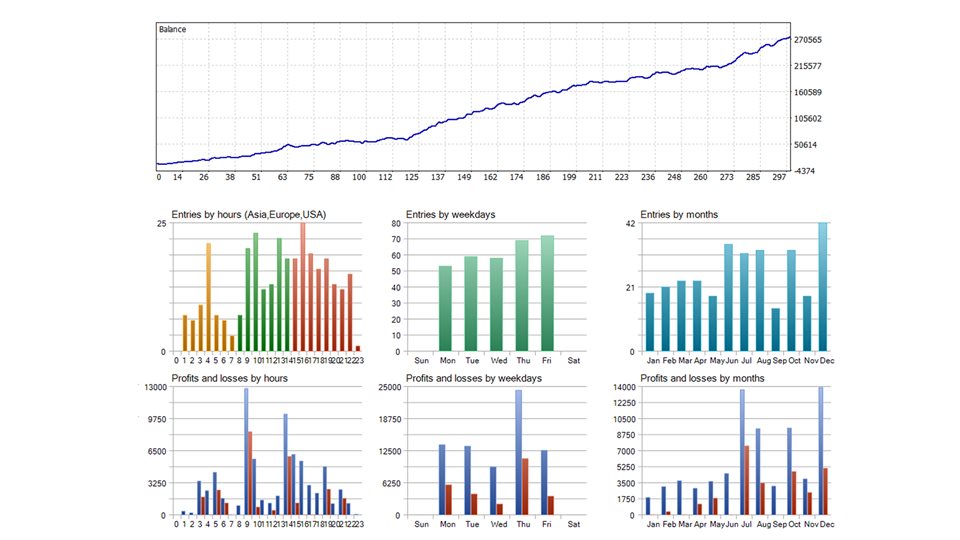
Screenshot #4 — Opal EA live monitoring / backtest overview (click to enlarge).
⚖️ Pros & Cons — Honest Review
| ✅ Pros | ❌ Cons / Risks |
|---|---|
| • 150-week live signal with withdrawals (paid for itself) • Rare EURUSD (non-Gold) diversification • News + time filters built in • Low $100 test floor, ECN-friendly • 2.35%/month realistic pace, not hype • One-time price $580 | • Recovery/grid — NO fixed SL per trade • Equity DD ~27% vs balance DD ~3% • Avg loss 3x avg win (needs 76%+ win rate) • Weak in one-way trends • Must run 24/7 on VPS • Never combine with other EAs |
HG Trade Verdict: a credible long-running EURUSD recovery EA for patient traders who understand grid math and fund for the worst basket. Not for small aggressive accounts, not for set-and-forget dreamers, and never for prop-firm challenges.
⚙️ How to Install (MT4) — About 3 Minutes
- First, get your broker ready (if you have not yet): OPEN EXNESS RAW → verify → create an MT4 Standard account. Want the safest small-capital test first? Try Exness Cent here.
- Copy Opal EA v1.0.ex4 into
MQL4 → Experts, restart MT4 and log in to your new Standard account. - Open EURUSD H1, drag the EA on, enable Allow Automated Trading + Allow Algo Trading. Keep defaults (low-mid risk) to begin with.
- Confirm news filter + time filter are ON and check Tools → Options → Expert Advisors for WebRequest permission if the news filter asks for URLs.
- Run it alone on the account — no second EA, no manual trades on EURUSD H1 beside it.
- Finally move MT4 onto a VPS close to your broker (FXVM / Digitalku) so the EA never goes offline.
📥 Free Download (2 Quick Steps + Telegram File)
STEP 1 (30 seconds): Open your Standard account so the defaults match your broker
🥇 STEP 1: OPEN EXNESS STANDARD
Safest first test: Exness Cent • VPS: FXVM / Digitalku
STEP 2: Opal EA v1.0.ex4 (MT4 • EURUSD H1 • v1.0)
File post on Telegram (parent post above the reply text):
⬇️ STEP 2: GET FILE ON TELEGRAM
Replace https://t.me/eahgtrade with the link to your exact Telegram FILE post (right-click the .ex4 post → Copy Message Link).
Includes: .ex4 (defaults low-mid risk)
Supports: Raw/ECN • VPS Required • Demo-verify first
Official MQL5: Opal EA $580 • Signal: Opal live signal
1. Broker → 2. VPS → 3. Attach EA to EURUSD H1. Then watch equity DD — not just balance.
Top pick: FBS (tight spreads + 100% bonus). First test: Exness Cent. VPS: Digitalku (ID) / FXVM (outside).
🥇 FBS BONUS 100%🧪 EXNESS CENT🇮🇩 DIGITALKU VPS💻 FXVM VPS
⚠️ Risk Disclaimer
Opal EA is a recovery (grid-style) EURUSD H1 system without fixed per-trade stop loss. Losing positions are averaged into baskets, so equity drawdown (~27% on the reference signal) can dwarf balance drawdown (~3%), average losses (~-$0.92) exceed average wins (~$0.28), and one-way trends can open large floating baskets. The +105.83% live result comes from a $500 Vantage 1:500 account over 150 weeks with withdrawals and does not promise future profits. Please forward-test on demo/cent for at least 4 weeks on Exness Standard demo, begin with defaults, keep news/time filters ON, run it alone, and only use cold money you will not need soon. Never use grid/recovery EAs for prop-firm challenges. This share is for education & evaluation only, not investment advice. Affiliate Disclosure: Exness, FBS, FXVM and Digitalku links are affiliate links — same price for you, and they keep our free shares running.
1. Quantum Emperor EA — GBPUSD H1 Trend Grid — earlier review of the same EA, compare the numbers
2. ThunderGold Scalper — 47-Second Gold Scalps — traffic winner, no-grid scalper as a healthy contrast
3. MoonDog EA — 5-Module Gold Breakout — must-read before running any recovery EA
🔗 References
- Opal EA — Official MQL5 Market ($580 • v1.0 • Nov 2023)
- Live Signal — Opal (+105.83%, 1,996 trades, PF 1.83)
- Oeyvind Borgsoe — Seller Profile (Norway, Relevant Trading)
- HG Trade — Opal EA Review May 2026 (103% growth snapshot)
- HG Trade Telegram — t.me/eahgtrade
Post a Comment